MirrorSsokFree beta 한국어English Download
Free beta

Many Android phones,
one PC screen

See your Android phones together over USB or Wi‑Fi and send the same action to the ones you pick. No app needed on your phone. This is a free beta. There’s no charge during the beta.

Windows 10/11 64-bit · No admin rights needed · Send feedback on the Feedback page or by email

No charge during the betaScreen data is not sent to the developer’s serversYou can apply as a beta tester
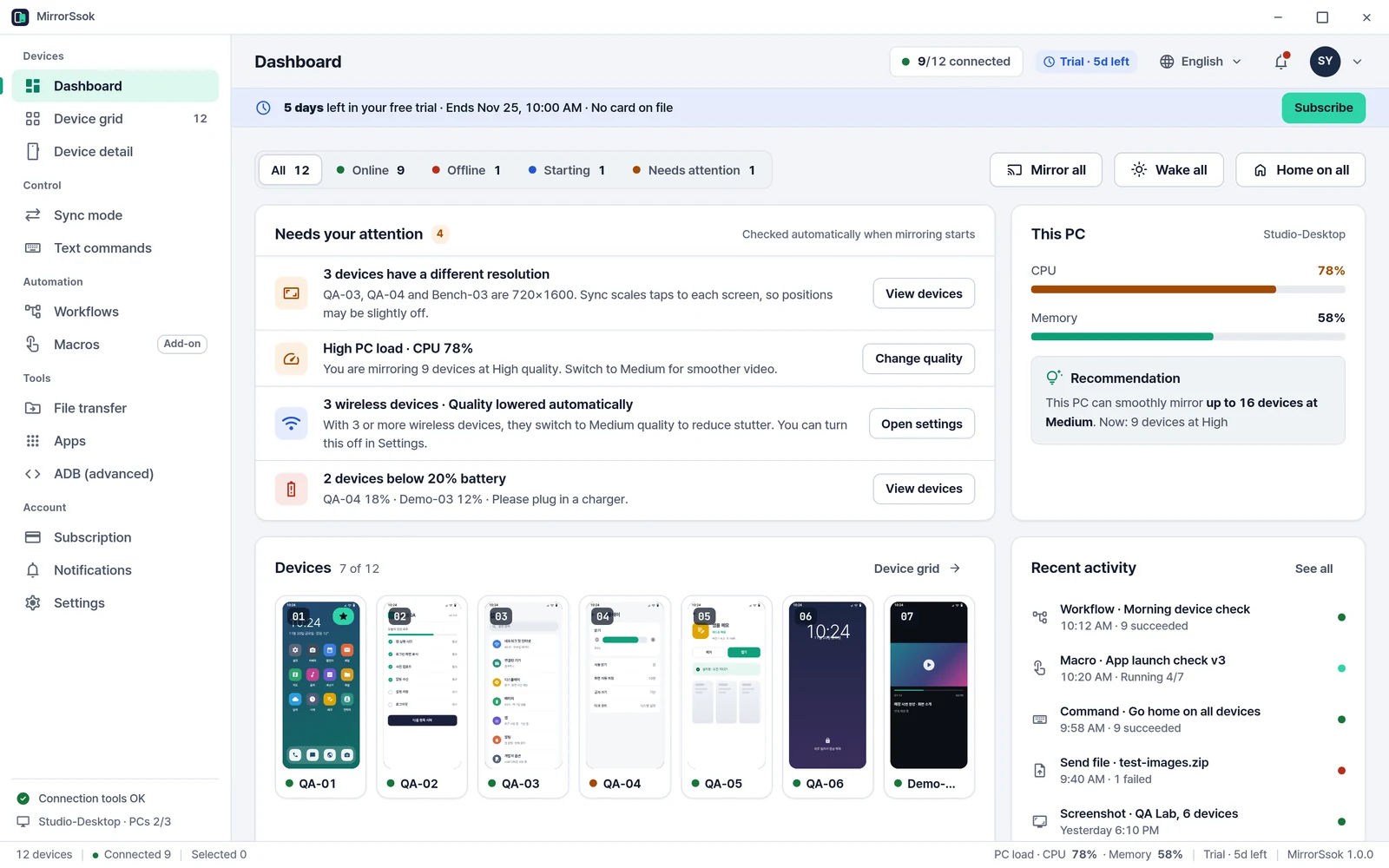
MirrorSsok dashboard showing connected phones and recent activity

Everything you need to work with many phones

No more picking up phones one by one. View, select and act from your PC.

See them all at once

Every connected phone appears as a live tile with its number, name, connection type and battery.

Pro

Act on many at once

Select several phones or a group and send Home, screenshots, app launches or text to all of them.

Connect without an app

Just turn on USB debugging. On Android 11 or later you can also pair over the same Wi‑Fi with a QR code. No app needed on your phone.

Screens stay on your PC

Screen data travels only to your PC over USB or your local network. It is not sent to the developer’s servers.

How teams use MirrorSsok

Made for work where many phones need the same steps.

App QA and demos

Run the same scenario
on many models at once

Line up phones with different screen sizes and Android versions, then launch and drive your app with the same steps. Each phone’s results are logged step by step, and you can rerun only the phones that failed.

  • Turn repeated checks into one-click workflows and macros
  • Per-phone results with screenshots of failed steps
  • Store app demo & test pack: install a test app → launch → run a test macro
Store app demo & test pack · Only for testing and demoing your own apps or apps you are authorized to use
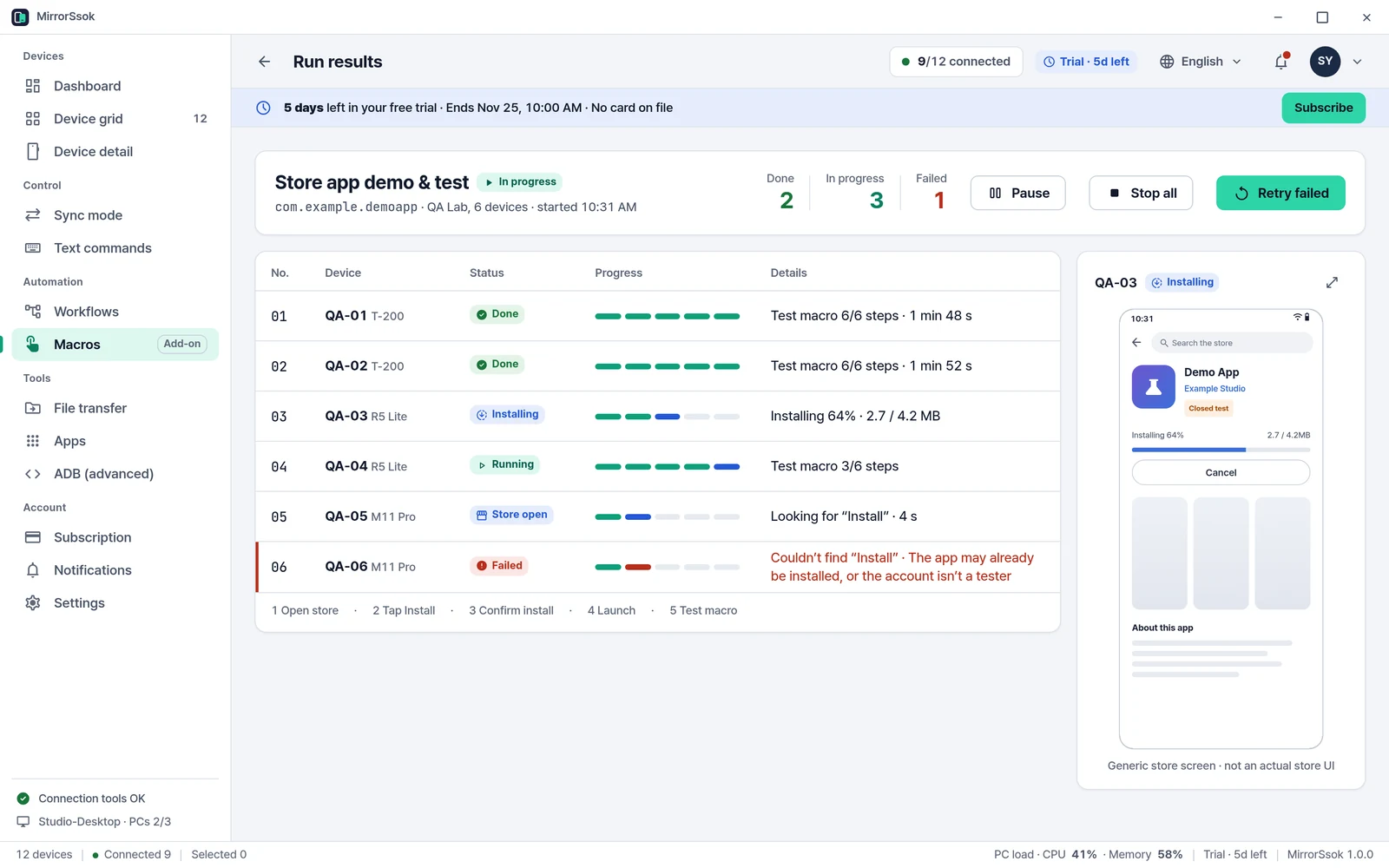
Store app demo and test in progress, showing each phone’s step status

Training and classes

Guide every lab phone
from one instructor screen

Group learners’ phones, watch them on one screen, and send the steps you tap on the lead phone to every lab phone. Spot anyone who fell behind right from the tiles.

  • Sync mode: one lead phone → the phones you choose
  • Organize classes with device groups and tags (Free)
  • Type the same text into all phones with text commands
In-house trainingDevice literacy classesRetail staff training

Demo video production

Capture several phones,
cleanly

When making product or how-to videos, show several phones side by side and record straight from your PC. No filming screens with a camera, no glare or shake.

  • Screen recording (Pro) and screenshots (Free)
  • Quality presets: Auto, High, Medium, Low
  • Mirror with the phone screen off to save heat and battery

Get started in 4 steps

First-time setup usually takes a few minutes. The in-app connection check helps if you get stuck.

1

Download and install

Run the Windows installer. It installs for your account with no admin rights, and nothing is installed on your phones. If SmartScreen shows an “Unknown publisher” warning, click “More info”, then “Run anyway”.

2

Turn on USB debugging

Tap the build number 7 times to unlock Developer options, then turn on USB debugging. The in-app guide helps for each model.

3

Connect over USB or Wi‑Fi

Use a data-capable cable and tap “Allow USB debugging”. On Android 11 or later you can also pair wirelessly with a QR code.

4

Select and act together

Connected phones appear in the grid. Organize them with groups and tags, and with Pro send the same action to many at once.

Read the full guide

Choose what you need

This is a free beta, with no charge during the beta. You can compare features on the pricing page.

Free

Get going with 2 phones

$0

No charge during the beta

  • Mirror and control up to 2 phones
  • File transfer and screenshots
  • 1 PC
  • USB and Wi‑Fi connection
  • Device groups and tags (naming, organizing)
  • No time limit
Free beta

Pro

For teams working with many phones

Free during beta

There’s no charge during the beta.

  • Unlimited phones
  • Up to 3 PCs
  • Group control (one command to a whole group), sync mode, text commands
  • Workflows and macros (add-on)
  • App manager, advanced ADB, screen recording
  • Everything in Free

There’s no charge during the beta.

Compare plans in detail

It’s a free beta right now

There’s no charge during the beta. We’re looking for testers who work with many phones. Send what you notice on the Feedback page. Join the free beta · Send feedback

Download for Windows